
SkinAndSpay
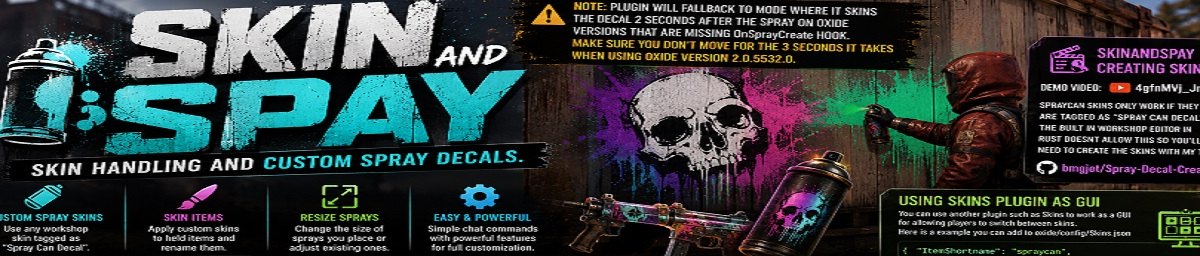
Custom Sprays
# SkinAndSpay
Skin Handling and Custom Spray Decals for Rust.
SkinAndSpay allows players to use custom Workshop skins for spray cans and wallpapers while also providing powerful tools for resizing decals and reskinning held items. Whether you're running an art-focused server or simply want more customization, SkinAndSpay makes it easy to personalize sprays beyond the limitations of vanilla Rust.
---
Features
- 🎨 Use custom Workshop spray decal skins.
- 🖌️ Apply custom wallpaper skins.
- 📏 Resize existing spray decals.
- 📐 Set a default size for all future sprays.
- 🏷️ Reskin held items with any Workshop skin.
- ✏️ Optionally rename items while reskinning.
- 🎁 Console commands for giving custom spray cans and wallpapers.
- 🔄 Automatic compatibility fallback for older Oxide builds missing
OnSprayCreate.
Compatibility
SkinAndSpay automatically detects whether your Oxide build supports the OnSprayCreate hook.
If it does not, the plugin falls back to skinning the spray decal approximately 2 seconds after placement.
Important: On older Oxide versions (such as 2.0.5532.0) players should remain still for roughly 3 seconds after spraying so the skin can be correctly applied.
---
# Chat Commands
| Command | Description |
|---------|-------------|
| /spray <skinid> | Toggle a custom spray can skin. |
| /spraysize <size> | Sets the default size for newly placed sprays. |
| /sprayresize <size> | Resizes the spray decal you're currently looking at. |
| /skinitem <skinid> | Reskins the held item. |
| /skinitem <skinid> "New Name" | Reskins and renames the held item. |
These commands are implemented by the plugin. :contentReference[oaicite:0]{index=0}
---
# Console Commands
| Command | Description |
|---------|-------------|
| spray.give <player> <skinid> | Gives a custom spray can. |
| wallpaper.give <player> <skinid> | Gives custom wallpaper. |
---
# Permissions
| Permission | Description |
|------------|-------------|
| SkinAndSpay.use | Allows players to change spray can and wallpaper skins. |
| SkinAndSpay.skin | Allows use of the item skinning command. |
| SkinAndSpay.size | Allows spray resize commands. |
The plugin registers these permissions during initialization. :contentReference[oaicite:1]{index=1}
---
# Creating Spray Skins
Spray decals must be uploaded with the "Spray Can Decal" tag.
Unfortunately, Rust's built-in Workshop uploader does not support creating this type of skin.
Use the Spray Decal Creator instead:
GitHub
https://github.com/bmgjet/Spray-Decal-Creator
Demo Video
https://www.youtube.com/watch?v=4gfnMVj_JnI
---
# Using Skins as a GUI
SkinAndSpay works perfectly alongside the Skins plugin.
Players can browse and select spray skins using the familiar GUI while SkinAndSpay handles spawning and applying the custom decals.
Example configuration:
{
  "Item Shortname": "spraycan",
  "Skins": [
    2816639887,
    2816652031,
    2816648654,
    2816580876,
    2816218649,
    2816218582,
    2816218516,
    2816218452,
    2816676408,
    2816675297,
    2816673852,
    2816773393,
    2816763883,
    2816766036,
    2816768996
  ]
}
---
# Perfect For
- Creative and build servers
- PvE communities
- Roleplay servers
- Event servers
- Custom artwork collections
- Server branding
- Community competitions
# Notes
- Custom spray decals only work with correctly tagged Workshop skins.
- Existing spray decals can be resized after placement.
- Future sprays can automatically use a custom size.
- Held items can be reskinned and optionally renamed.
- Supports both spray cans and wallpapers.
- Designed to remain compatible across both newer and older Oxide versions.